Tuesday, March 13, 2012

Remove SVN, Add SVN in Linux


There are times we just want to copy the source files and add it to SVN. The problem is, if we copy the whole folder, we also copy the SVN link. You could remove the ".svn" one by one, but then again, that would be REALLY tedious.


Saturday, March 10, 2012

Connect WAMP 2 server to PosgreSQL Database


For those who want to connect to PosgreSQL using WAMP as your server, just follow the procedure and you'll be ready to start!


Tuesday, March 6, 2012

WAMP Server 2 HTTPS SSL Configuration


What I want to achieve is to send email from my localhost host to my gmail account. But since Gmail uses SSL encryption, I figured that I need to enable SSL of my WAMP server.


Thursday, January 19, 2012

MySQL: MyISAM vs InnoDB


I was pondering what is the difference of MyISAM and InnoDB? They are both types of database in MySQL. For MySQL v5.4 and lower, the default is MyISAM; For MySQL v5.5 and higher, the default is InnoDB. What is their difference? How will I know what to choose? Choosing the right type is crucial in database designing.

Friday, December 16, 2011

Dynamic database connection in CakePhp

I encountered this scenario at work wherein I have the same logic, same structure but using different brands. The problem is their database name and connection is different. Below is the solution I found:

Step 1: Create your database connection in database.php
var $brandXConfig = array(
 'driver' => 'postgres',
 'persistent' => false,
 'host' => 'localhost',
 'login' => 'root',
 'password' => '',
 'database' => 'brand_x',
 'prefix' => '',
 //'encoding' => 'utf8',
);


var $brandYConfig = array(
 'driver' => 'postgres',
 'persistent' => false,
 'host' => 'localhost',
 'login' => 'root',
 'password' => '',
 'database' => 'brand_y',
 'prefix' => '',
 //'encoding' => 'utf8',
);

Step 2: Add this function to app_model.php
Class AppModel extends Model
{
     function changeDataSource($newSource)  {
          parent::setDataSource($newSource);
          parent::__construct();
     }
}

Step 3: Add this function to app_controller.php
Class AppController extends Controller
{
     function changeDbSource($database = 'default') {
          $db = ConnectionManager::getInstance();
          $connected = $db->getDataSource($database);
          if($connected->isConnected()) 
                return true;
          return false;
     }
}

Step 4: Add this to your model
function changeMyDb($brand)
{
     if($brand == 'brandX') {
          $this->changeDataSource('brandXConfig');
     }
     else if($brand == 'brandY') {
          $this->changeDataSource('brandYConfig');
     }
}

After doing this, you'd be able to change your database connection as needed.

Wednesday, December 7, 2011

Change username or password of database

Database security concerns the use of a broad range of information security controls to protect databases (potentially including the data, the database applications or stored functions, the database systems, the database servers and the associated network links) against compromises of their confidentiality, integrity and availability.
One of the things you should do to secure your data is to change the username and password of your database. It is quite easy to do, just remember that if you change it, make sure to also change your settings in your application.
I am using wamp server and mysql as my database. Here are the steps to do this:
  1. Open config.inc.php. Mine is located at C:\wamp\apps\phpmyadmin3.2.0.1
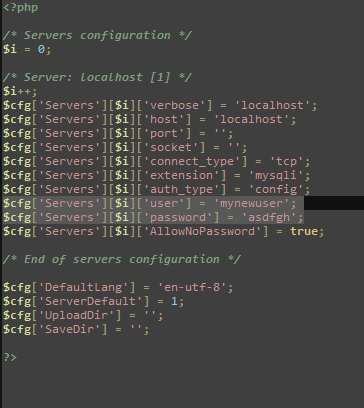
  2. Change the settings for username and password. By default, it is set to 'root' and empty for password. In the figure below I changed my username to 'mynewuser' and my password to 'asdfgh'. Of course you could change it to something more secure.
  3. Fig 1: Sample of config.inc.php
  4. Lastly, Restart your server so changes will be on effect.

It's easy and makes your database more secure.

Sunday, November 27, 2011

Fastest PHP Framework

A web application framework is designed to support the development of dynamic websites, web applications and web services. It aims to alleviate the overhead associated with common activities performed in development such as database access, templating frameworks and session management, and it often promotes code reuse.
I have been coding Web Applications using PHP for a while and I find frameworks as very useful. It has an MVC (Model-View-Controller) approach, enforces good coding standards, has helpers and components which makes my coding life easier and saves me a lot of time and effort with its features. I and my officemates have been using CakePHP as our PHP framework for awhile and we think that its performance is becoming slow. We're thinking of trying out CodeIgniter, another famous PHP framework, but it makes me wonder, if it really is the fastest and most feature friendly framework we are looking for?

I did some research and I found DooPHP has quite an interesting portfolio.
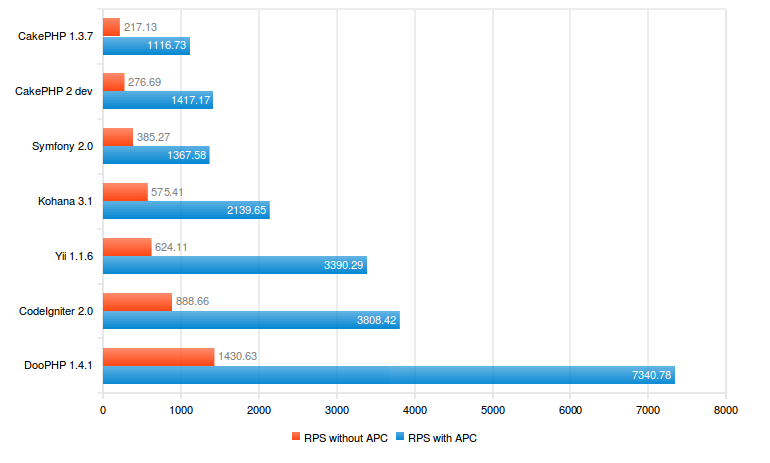
Fig 1: DooPHP benchmark as of Febuary 25, 2011
DooPHP is claiming it might be the fastest MVC based PHP framework in the world. Beside that, it comes with features essential to today's Web 2.0 application development. It focuses on 7 main cores: MVC, REST, URI routing, ORM, Template engine, ease of use and performance. It even has a very loosely coupled design where developers can modify and add new functionailies to the framework easily.

Quite interesting right? What's not to like in this framework? Well for me, since it is still relatively new (started in 2009), I don't think it has a wide support base unlike its predecessors. Also, it feels like a hybrid framework. Why? One of the reasons why we use frameworks is because of its support for MVC.
function signup_action() {
/* Set the pages title */
$this->data['pagetitle'] = 'Signup';
// Load the User Model
Doo::loadModel('User');
// Get a new User Model Instance
$user = new User;
// Try and find a User with the specified username
$result = Doo::db()->find($user, array('limit' => 1));
}
In this example, we can see that it is accessing its data through the controller. That is not a good practice for "FAT MODELS, THIN CONTROLLERS" approach. It destroys the ideal MVC. Sure, it is faster but maintainability and reusability wise, it could be a pain in the future. For small scale projects, this could work since maintainability won't be much of an issue. Also, I get the feeling that it is like I am using classic PHP because I have to do/declare everything by myself as shown below:
Doo::loadCore('db/DooModel');
class User extends DooModel {
    public $id;
    public $username;
    public $password;
    public $group;

    public $_table = 'user';
    public $_primarykey = 'id';
    public $_fields = array('id', 'username', 'password', 'group');

    function __construct(){
        parent::$className =;__CLASS__;
    }
}

The closer you are to classic PHP, the faster your codes will be. Rasmus Lerdorf, the Godfather of PHP himself, believes that frameworks aren’t that great because they perform much slower than simple PHP. If you have to use a PHP framework, Rasmus likes Code Igniter the best, as it is "least like a framework"[2008]. We all have different needs, different wants and it all boils down to which framework will suit it. DooPHP is still young. It might be the fastest because it is almost similar to classic PHP, but it might be problematic in terms of scalability. Maybe after a few more years and this will be a framework to watch out for!

For now, I think I'll stick to CakePHP and will try its new stable version 2.0. :)

Other helpful resources:
DooPhp model guide
Learn DooPhp
10 Principles of the PHP Masters
CakePHP Best Practices: Fat Models and Skinny Controllers