Showing posts with label configuration. Show all posts
Tuesday, March 13, 2012
Remove SVN, Add SVN in Linux
There are times we just want to copy the source files and add it to SVN. The problem is, if we copy the whole folder, we also copy the SVN link. You could remove the ".svn" one by one, but then again, that would be REALLY tedious.
Saturday, March 10, 2012
Connect WAMP 2 server to PosgreSQL Database
For those who want to connect to PosgreSQL using WAMP as your server, just follow the procedure and you'll be ready to start!
Labels:
Apache,
configuration,
others,
php,
postgres,
Wamp Server
Friday, December 16, 2011
Dynamic database connection in CakePhp
I encountered this scenario at work wherein I have the same logic, same structure but using different brands. The problem is their database name and connection is different. Below is the solution I found:
Step 1: Create your database connection in database.php
Step 2: Add this function to app_model.php
Step 3: Add this function to app_controller.php
Step 4: Add this to your model
After doing this, you'd be able to change your database connection as needed.
Step 1: Create your database connection in database.php
var $brandXConfig = array( 'driver' => 'postgres', 'persistent' => false, 'host' => 'localhost', 'login' => 'root', 'password' => '', 'database' => 'brand_x', 'prefix' => '', //'encoding' => 'utf8', ); var $brandYConfig = array( 'driver' => 'postgres', 'persistent' => false, 'host' => 'localhost', 'login' => 'root', 'password' => '', 'database' => 'brand_y', 'prefix' => '', //'encoding' => 'utf8', );
Step 2: Add this function to app_model.php
Class AppModel extends Model
{
function changeDataSource($newSource) {
parent::setDataSource($newSource);
parent::__construct();
}
}
Step 3: Add this function to app_controller.php
Class AppController extends Controller
{
function changeDbSource($database = 'default') {
$db = ConnectionManager::getInstance();
$connected = $db->getDataSource($database);
if($connected->isConnected())
return true;
return false;
}
}
Step 4: Add this to your model
function changeMyDb($brand)
{
if($brand == 'brandX') {
$this->changeDataSource('brandXConfig');
}
else if($brand == 'brandY') {
$this->changeDataSource('brandYConfig');
}
}
After doing this, you'd be able to change your database connection as needed.
Wednesday, December 7, 2011
Change username or password of database
Database security concerns the use of a broad range of information security controls to protect databases (potentially including the data, the database applications or stored functions, the database systems, the database servers and the associated network links) against compromises of their confidentiality, integrity and availability.
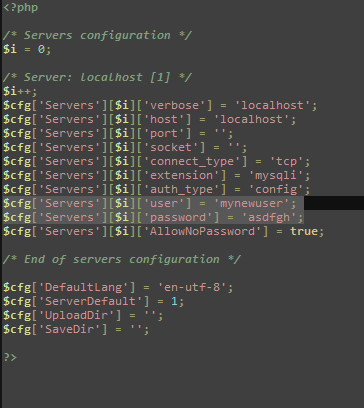
One of the things you should do to secure your data is to change the username and password of your database. It is quite easy to do, just remember that if you change it, make sure to also change your settings in your application.
I am using wamp server and mysql as my database. Here are the steps to do this:
- Open config.inc.php. Mine is located at C:\wamp\apps\phpmyadmin3.2.0.1
- Change the settings for username and password. By default, it is set to 'root' and empty for password. In the figure below I changed my username to 'mynewuser' and my password to 'asdfgh'. Of course you could change it to something more secure.
- Lastly, Restart your server so changes will be on effect.
It's easy and makes your database more secure.
Subscribe to:
Posts (Atom)