Thursday, January 19, 2012
MySQL: MyISAM vs InnoDB
I was pondering what is the difference of MyISAM and InnoDB? They are both types of database in MySQL. For MySQL v5.4 and lower, the default is MyISAM; For MySQL v5.5 and higher, the default is InnoDB. What is their difference? How will I know what to choose? Choosing the right type is crucial in database designing.
Friday, December 16, 2011
Dynamic database connection in CakePhp
I encountered this scenario at work wherein I have the same logic, same structure but using different brands. The problem is their database name and connection is different. Below is the solution I found:
Step 1: Create your database connection in database.php
Step 2: Add this function to app_model.php
Step 3: Add this function to app_controller.php
Step 4: Add this to your model
After doing this, you'd be able to change your database connection as needed.
Step 1: Create your database connection in database.php
var $brandXConfig = array( 'driver' => 'postgres', 'persistent' => false, 'host' => 'localhost', 'login' => 'root', 'password' => '', 'database' => 'brand_x', 'prefix' => '', //'encoding' => 'utf8', ); var $brandYConfig = array( 'driver' => 'postgres', 'persistent' => false, 'host' => 'localhost', 'login' => 'root', 'password' => '', 'database' => 'brand_y', 'prefix' => '', //'encoding' => 'utf8', );
Step 2: Add this function to app_model.php
Class AppModel extends Model
{
function changeDataSource($newSource) {
parent::setDataSource($newSource);
parent::__construct();
}
}
Step 3: Add this function to app_controller.php
Class AppController extends Controller
{
function changeDbSource($database = 'default') {
$db = ConnectionManager::getInstance();
$connected = $db->getDataSource($database);
if($connected->isConnected())
return true;
return false;
}
}
Step 4: Add this to your model
function changeMyDb($brand)
{
if($brand == 'brandX') {
$this->changeDataSource('brandXConfig');
}
else if($brand == 'brandY') {
$this->changeDataSource('brandYConfig');
}
}
After doing this, you'd be able to change your database connection as needed.
Wednesday, December 7, 2011
Change username or password of database
Database security concerns the use of a broad range of information security controls to protect databases (potentially including the data, the database applications or stored functions, the database systems, the database servers and the associated network links) against compromises of their confidentiality, integrity and availability.
One of the things you should do to secure your data is to change the username and password of your database. It is quite easy to do, just remember that if you change it, make sure to also change your settings in your application.
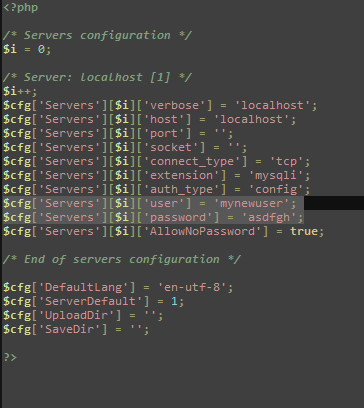
I am using wamp server and mysql as my database. Here are the steps to do this:
- Open config.inc.php. Mine is located at C:\wamp\apps\phpmyadmin3.2.0.1
- Change the settings for username and password. By default, it is set to 'root' and empty for password. In the figure below I changed my username to 'mynewuser' and my password to 'asdfgh'. Of course you could change it to something more secure.
- Lastly, Restart your server so changes will be on effect.
It's easy and makes your database more secure.
Sunday, November 27, 2011
Fastest PHP Framework
A web application framework is designed to support the development of dynamic websites, web applications and web services. It aims to alleviate the overhead associated with common activities performed in development such as database access, templating frameworks and session management, and it often promotes code reuse.
I have been coding Web Applications using PHP for a while and I find frameworks as very useful. It has an MVC (Model-View-Controller) approach, enforces good coding standards, has helpers and components which makes my coding life easier and saves me a lot of time and effort with its features. I and my officemates have been using CakePHP as our PHP framework for awhile and we think that its performance is becoming slow. We're thinking of trying out CodeIgniter, another famous PHP framework, but it makes me wonder, if it really is the fastest and most feature friendly framework we are looking for?
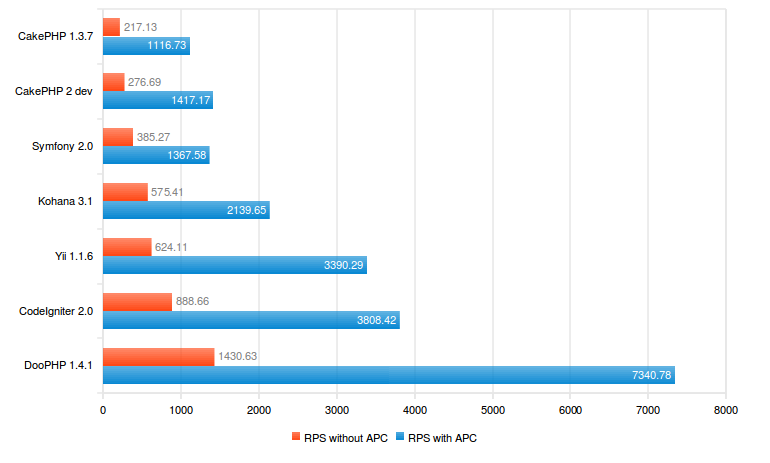
I did some research and I found DooPHP has quite an interesting portfolio.
Quite interesting right? What's not to like in this framework? Well for me, since it is still relatively new (started in 2009), I don't think it has a wide support base unlike its predecessors. Also, it feels like a hybrid framework. Why? One of the reasons why we use frameworks is because of its support for MVC.
function signup_action() {
/* Set the pages title */
$this->data['pagetitle'] = 'Signup';
// Load the User Model
Doo::loadModel('User');
// Get a new User Model Instance
$user = new User;
// Try and find a User with the specified username
$result = Doo::db()->find($user, array('limit' => 1));
}
In this example, we can see that it is accessing its data through the controller. That is not a good practice for "FAT MODELS, THIN CONTROLLERS" approach. It destroys the ideal MVC. Sure, it is faster but maintainability and reusability wise, it could be a pain in the future. For small scale projects, this could work since maintainability won't be much of an issue. Also, I get the feeling that it is like I am using classic PHP because I have to do/declare everything by myself as shown below:
Doo::loadCore('db/DooModel');
class User extends DooModel {
public $id;
public $username;
public $password;
public $group;
public $_table = 'user';
public $_primarykey = 'id';
public $_fields = array('id', 'username', 'password', 'group');
function __construct(){
parent::$className =;__CLASS__;
}
}
The closer you are to classic PHP, the faster your codes will be. Rasmus Lerdorf, the Godfather of PHP himself, believes that frameworks aren’t that great because they perform much slower than simple PHP. If you have to use a PHP framework, Rasmus likes Code Igniter the best, as it is "least like a framework"[2008]. We all have different needs, different wants and it all boils down to which framework will suit it. DooPHP is still young. It might be the fastest because it is almost similar to classic PHP, but it might be problematic in terms of scalability. Maybe after a few more years and this will be a framework to watch out for!
For now, I think I'll stick to CakePHP and will try its new stable version 2.0. :)
Other helpful resources:
DooPhp model guide
Learn DooPhp
10 Principles of the PHP Masters
CakePHP Best Practices: Fat Models and Skinny Controllers
Friday, November 25, 2011
JSON encode auto sorting issue
JSON is used to send data as an object either be an array or string.
I used AJAX to pass on my data from server to client. My intention was to populate a drop down list with values dynamically. I had created my array list as show below:
$result = array( '5' => 'a', '2' => 'b', '3' => 'c', '4' => 'd', );
echo json_encode(array( 'result' => 'success', 'details' => $result ));
I was expecting to see my array as is, but I was confused when I checked my JSON result array was as shown below:
array { result: "success", details: [{ 2: "b", 3: "c", 4: "d", 5: "a" }] }
See the problem? My array values were automatically sorted out. I found out that this is a browser issue with Google Chrome. I checked this using Firefox and there was no problem. So what is the solution to this problem? There are two ways:
- Don't use json_encode. I used this method because I realized I didn't really need to populate my dropdown list dynamically. I just needed static data for selection.
- Sort it out before appending to its drop down element.
// data.details came from json_encode in the example above.
//arrVals should be an array.
var arrVals = data.details();
arrVals.sort(function(a, b){
if(a.val>b.val){
return 1;
}
else if (a.val==b.val){
return 0;
}
else {
return -1;
}
});
Hopefully, Google Chrome will fix this bug so we won't encounter this again or performance will not be wasted.
Sources:
Sorting (dropdown) Select Options Using jQuery
Sort a select list box
Labels:
AJAX,
browser,
javascript,
jQuery,
JSON,
json_encode,
php,
sort
Wednesday, November 23, 2011
CakePHP vs CodeIgniter
Web application framework, a software framework for development of dynamic websites, web applications, and web services
Nowadays, framework is important for us to create an agile, self-documented and organized Web Application. There has been a long fuss between these two great frameworks: CakePHP and CodeIgniter. But the question still remains, which framework should I choose? Read on to find out.
Both CodeIgniter and CakePHP are best suited for object oriented programming and support the Model View Controller architecture which provides robustness and flexibility to a great extent. CakePHP is the better one when it comes to robustness and strictness of conventions, which is appreciated by a section of the programmer community because it is easy to remember. On the other hand, venturesome programmers see this as a shortcoming in CakePHP. CodeIgniter has a wide built-in library that serves most of the purpose of a beginner in PHP programming. For those ahead of the rest, CodeIgniter lets them create their own libraries or rather classes within those libraries barring the database classes. There are certain simple naming conventions that need to be followed. The flexibility of creating custom classes and modifying existing native classes is something highly appreciated by radical programmers, always itching to create something different. CakePHP on the other hand, is more in demand with hard core PHP guys for its robustness and superior auto-load features. ORM is another strong point of CakePHP. In terms of speed, CodeIgniter wins hands down.
Both CakePHP and CodeIgniter has an active community and is open-source so development and improvements are continuously being done. They say clarity of documentation and online support community of CodeIgniter is far better than CakePHP, which makes it the framework of choice for toddler programmers and experts alike. For me, I prefer the documentation of CakePHP. Recently, they updated their website and I like the changes because now the community can edit the documentation. It is also easily searchable and well-organized; There is a blog tutorial that will easily help you jumpstart in getting used to CakePHP.
Bottomline, if you're a beginner you're best bet will be using CodeIgniter because it is closer to classic PHP, faster to learn, easy to use and fast. Otherwise, choose CakePHP for its strict MVC, robustness, data sanitation, and support for PHP4 and PHP5.
Monday, November 14, 2011
JQuery Scroll to top plugin
I am using this template at work and I find this plugin to be cool and useful. It's a JQuery Scroll to Top Dynamic Plugin by Matt Varone! It is a good UX design especially when you have a lengthy website and it is very easy to use.
Easy right? Try it out!
Reference: UItoTop jQuery Plugin - Matt
Fig 1: Screen shot
STEP 1: DOWNLOAD FILE
You may download file by clicking this link or manually download it by visiting Matt Varone's websiteSTEP 2: INCLUDE JAVASCRIPT AND CSS FILES
STEP 3: ADD THE MAGIC WORDS
Easy right? Try it out!
Reference: UItoTop jQuery Plugin - Matt
Labels:
design,
javascript,
jQuery,
UI Design,
web design,
web presentation
Subscribe to:
Posts (Atom)