

Monday, December 9, 2013
Create Custom Validation with namespace using Laravel 4 (Part 1)

Wednesday, October 16, 2013
Disable Inspect Element/Source Viewing by mouse click in a website
Monday, October 14, 2013
Complete Guide on how to Install Laravel 4 in Linux Ubuntu
Upgrade PHP 5.3.x to 5.4.x in UBUNTU 12.04
Saturday, June 8, 2013
Send email from localhost WAMP server using sendmail

Most of applications today are sending email to their subscribers or followers. During development stage, we need to test how this emails will look like. So, today we're going to configure our Wamp server to send an email. Here's the steps to achieve this:
Monday, February 25, 2013
Github for Windows through proxies

Friday, January 11, 2013
Laravel - A Clean & Classy framework?
Wednesday, December 26, 2012
Setting up a Virtual Host in Linux (Ubuntu)
There are times when you use a framework such as Symfony or Laravel, there are configurations that needs to be done. One of that configuration is pointing your path to web folder (Symfony) or public folder (Laravel) when you are preparing a hostname for your site. The advantage of this is protecting your files what can be seen publicly and what's not. So, today, I'll be setting up virtual host in Linux Ubuntu.
Friday, November 9, 2012
MySQL Binlog problem
Sunday, August 5, 2012
Google Devfest 2012

Wednesday, July 18, 2012
How To Configure Proxy Settings In Eclipse

Eclipse IDE may need access to the Internet for some plugins install and update. Most of the time, we need proxy so that we can pass thru and update these plugins. For those who are insterested how to do this, read on.
Tuesday, May 29, 2012
Setup free web hosting and free web domain
We create great designs and great works but how do we display it online? Well, we could use online and easy to use blogging tools like blogger and wordpress, but sometimes we just don't like the domain name to contain .blogspot.com, or .wordpress.com. So here's the trick, you could purchase a domain name or just use free stuff like http://www.co.cc.
Wednesday, April 25, 2012
Makeup in Photoshop

Not everybody is gifted to have a beautiful picture perfect face that we most certainly want. Good thing there is Adobe Photoshop, a simple editting tool that we can use to enhance the picture that was taken. In this tutorial, we will be enhancing the face of Scarlett Johansson. Read on to find out how.
Tuesday, March 13, 2012
Remove SVN, Add SVN in Linux

There are times we just want to copy the source files and add it to SVN. The problem is, if we copy the whole folder, we also copy the SVN link. You could remove the ".svn" one by one, but then again, that would be REALLY tedious.
Saturday, March 10, 2012
Connect WAMP 2 server to PosgreSQL Database
For those who want to connect to PosgreSQL using WAMP as your server, just follow the procedure and you'll be ready to start!
Tuesday, March 6, 2012
WAMP Server 2 HTTPS SSL Configuration
What I want to achieve is to send email from my localhost host to my gmail account. But since Gmail uses SSL encryption, I figured that I need to enable SSL of my WAMP server.
Thursday, January 19, 2012
MySQL: MyISAM vs InnoDB

I was pondering what is the difference of MyISAM and InnoDB? They are both types of database in MySQL. For MySQL v5.4 and lower, the default is MyISAM; For MySQL v5.5 and higher, the default is InnoDB. What is their difference? How will I know what to choose? Choosing the right type is crucial in database designing.
Friday, December 16, 2011
Dynamic database connection in CakePhp
I encountered this scenario at work wherein I have the same logic, same structure but using different brands. The problem is their database name and connection is different. Below is the solution I found:
Step 1: Create your database connection in database.php
Step 2: Add this function to app_model.php
Step 3: Add this function to app_controller.php
Step 4: Add this to your model
After doing this, you'd be able to change your database connection as needed.
Step 1: Create your database connection in database.php
var $brandXConfig = array(
 'driver' => 'postgres',
 'persistent' => false,
 'host' => 'localhost',
 'login' => 'root',
 'password' => '',
 'database' => 'brand_x',
 'prefix' => '',
 //'encoding' => 'utf8',
);


var $brandYConfig = array(
 'driver' => 'postgres',
 'persistent' => false,
 'host' => 'localhost',
 'login' => 'root',
 'password' => '',
 'database' => 'brand_y',
 'prefix' => '',
 //'encoding' => 'utf8',
);
Step 2: Add this function to app_model.php
Class AppModel extends Model
{
     function changeDataSource($newSource)  {
          parent::setDataSource($newSource);
          parent::__construct();
     }
}
Step 3: Add this function to app_controller.php
Class AppController extends Controller
{
     function changeDbSource($database = 'default') {
          $db = ConnectionManager::getInstance();
          $connected = $db->getDataSource($database);
          if($connected->isConnected())
                return true;
          return false;
     }
}
Step 4: Add this to your model
function changeMyDb($brand)
{
     if($brand == 'brandX') {
          $this->changeDataSource('brandXConfig');
     }
     else if($brand == 'brandY') {
          $this->changeDataSource('brandYConfig');
     }
}
After doing this, you'd be able to change your database connection as needed.
Wednesday, December 7, 2011
Change username or password of database
Database security concerns the use of a broad range of information security controls to protect databases (potentially including the data, the database applications or stored functions, the database systems, the database servers and the associated network links) against compromises of their confidentiality, integrity and availability.
One of the things you should do to secure your data is to change the username and password of your database. It is quite easy to do, just remember that if you change it, make sure to also change your settings in your application.
I am using wamp server and mysql as my database. Here are the steps to do this:
- Open config.inc.php. Mine is located at C:\wamp\apps\phpmyadmin3.2.0.1
- Change the settings for username and password. By default, it is set to 'root' and empty for password. In the figure below I changed my username to 'mynewuser' and my password to 'asdfgh'. Of course you could change it to something more secure.
- Lastly, Restart your server so changes will be on effect.
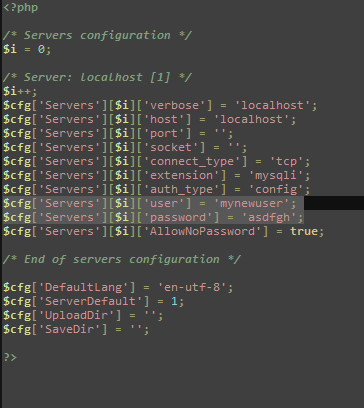
It's easy and makes your database more secure.
Sunday, November 27, 2011
Fastest PHP Framework
A web application framework is designed to support the development of dynamic websites, web applications and web services. It aims to alleviate the overhead associated with common activities performed in development such as database access, templating frameworks and session management, and it often promotes code reuse.
I have been coding Web Applications using PHP for a while and I find frameworks as very useful. It has an MVC (Model-View-Controller) approach, enforces good coding standards, has helpers and components which makes my coding life easier and saves me a lot of time and effort with its features. I and my officemates have been using CakePHP as our PHP framework for awhile and we think that its performance is becoming slow. We're thinking of trying out CodeIgniter, another famous PHP framework, but it makes me wonder, if it really is the fastest and most feature friendly framework we are looking for?
I did some research and I found DooPHP has quite an interesting portfolio.
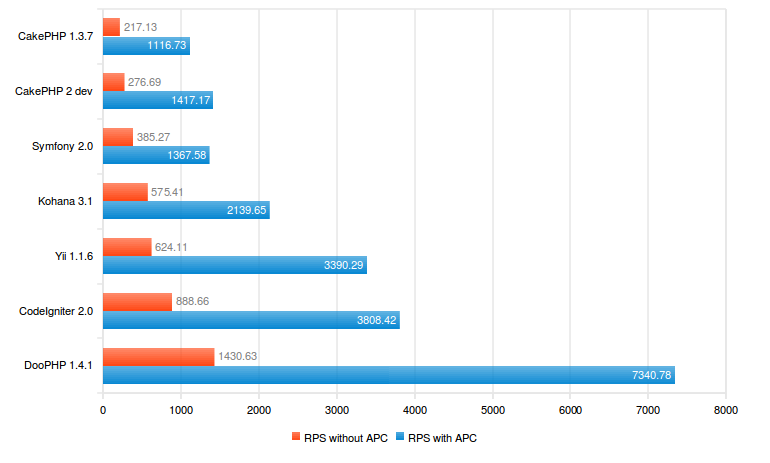
Quite interesting right? What's not to like in this framework? Well for me, since it is still relatively new (started in 2009), I don't think it has a wide support base unlike its predecessors. Also, it feels like a hybrid framework. Why? One of the reasons why we use frameworks is because of its support for MVC.
function signup_action() {
/* Set the pages title */
$this->data['pagetitle'] = 'Signup';
// Load the User Model
Doo::loadModel('User');
// Get a new User Model Instance
$user = new User;
// Try and find a User with the specified username
$result = Doo::db()->find($user, array('limit' => 1));
}
In this example, we can see that it is accessing its data through the controller. That is not a good practice for "FAT MODELS, THIN CONTROLLERS" approach. It destroys the ideal MVC. Sure, it is faster but maintainability and reusability wise, it could be a pain in the future. For small scale projects, this could work since maintainability won't be much of an issue. Also, I get the feeling that it is like I am using classic PHP because I have to do/declare everything by myself as shown below:
Doo::loadCore('db/DooModel');
class User extends DooModel {
    public $id;
    public $username;
    public $password;
    public $group;

    public $_table = 'user';
    public $_primarykey = 'id';
    public $_fields = array('id', 'username', 'password', 'group');

    function __construct(){
        parent::$className =;__CLASS__;
    }
}
The closer you are to classic PHP, the faster your codes will be. Rasmus Lerdorf, the Godfather of PHP himself, believes that frameworks aren’t that great because they perform much slower than simple PHP. If you have to use a PHP framework, Rasmus likes Code Igniter the best, as it is "least like a framework"[2008]. We all have different needs, different wants and it all boils down to which framework will suit it. DooPHP is still young. It might be the fastest because it is almost similar to classic PHP, but it might be problematic in terms of scalability. Maybe after a few more years and this will be a framework to watch out for!
For now, I think I'll stick to CakePHP and will try its new stable version 2.0. :)
Other helpful resources:
DooPhp model guide
Learn DooPhp
10 Principles of the PHP Masters
CakePHP Best Practices: Fat Models and Skinny Controllers
Subscribe to:
Posts (Atom)